

BuzzTV boxes are made for IPTV and have their own excellent TV guide. Setting up your BuzzTV box with SmartTVs takes four steps: open Server Settings, choose XC API, enter your details and watch. It works on all BuzzTV Android boxes including PowerStation 6, XRS 4000/4500, XPL 3000 and E2000.
Before you start: you need an active SmartTVs login. No account yet? Start a free trial and we’ll send your details on WhatsApp.
What You Need for BuzzTV box IPTV
- A BuzzTV box connected to the internet
- Your SmartTVs server URL, username and password from WhatsApp
- The BuzzTV remote
How to Set Up BuzzTV box IPTV (Step by Step)
Follow each part in order. Every step has a real screenshot so you can check you are on the right screen.
Part 1: Open Server Settings
-
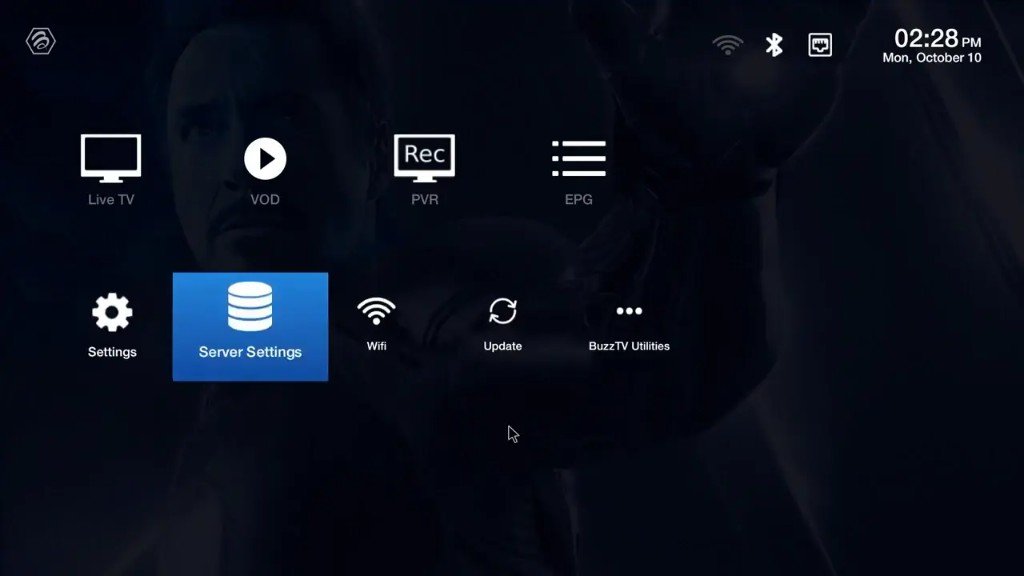
From the BuzzTV home screen, highlight Server Settings (database / stack icon) and open it.
Part 2: Choose XC API Login
-
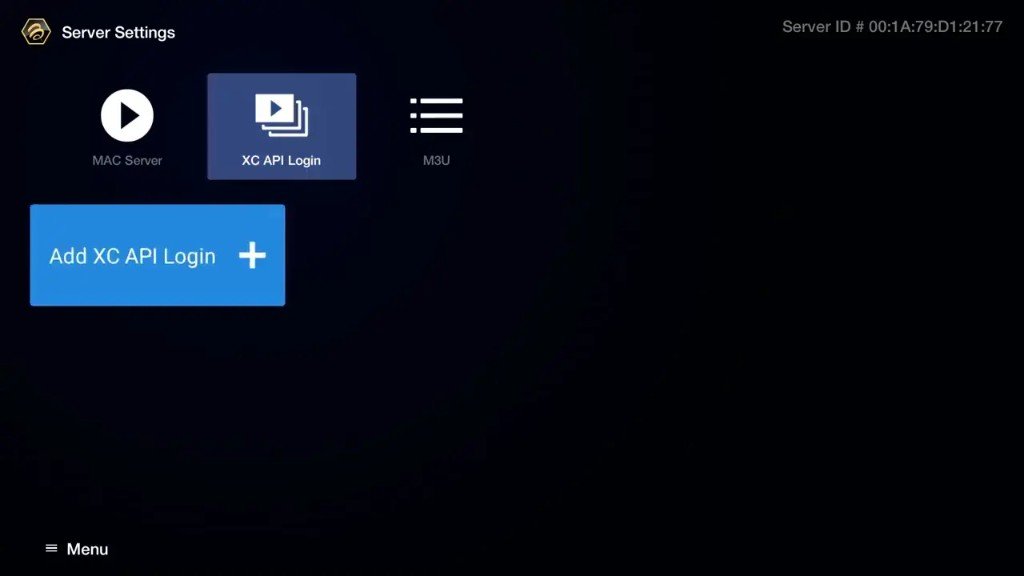
On Server Settings, select XC API Login (middle option — not MAC Server, not M3U). Your Server ID shows at the top-right.
-
Press the blue button Add XC API Login +.
Part 3: Enter SmartTVs credentials
-
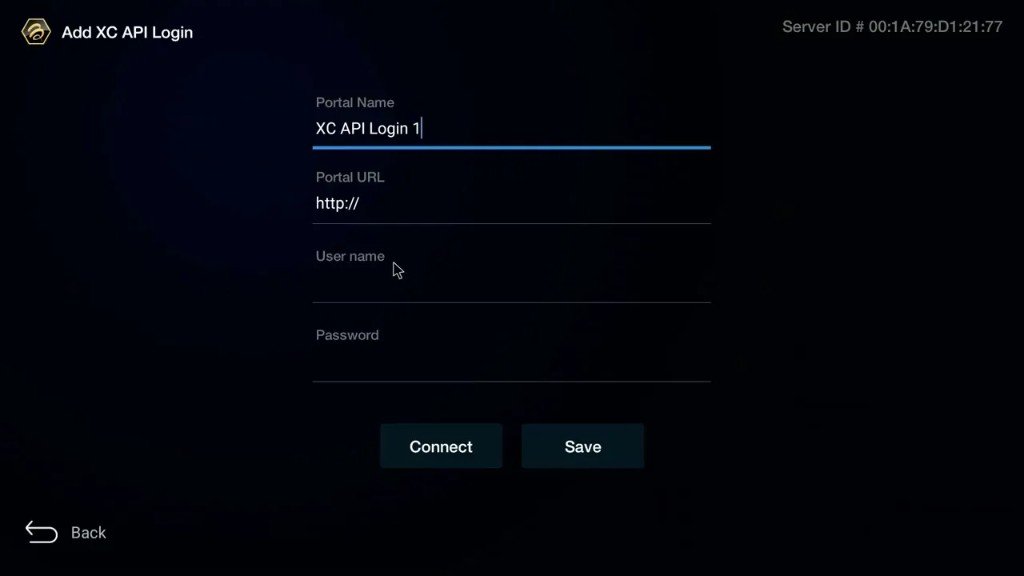
On the Add XC API Login form, fill in the fields from WhatsApp, then press Connect (or Save, then Connect):
- Portal Name: any name (e.g. SmartTVs)
- Portal URL: server URL exactly as sent (keep http:// if included)
- Username: your IPTV username
- Password: your IPTV password
Part 4: Watch Live TV / VOD
-
Wait while BuzzTV loads the playlist, then return Home and open Live TV to confirm a channel plays.
-
Use VOD for movies & series, or EPG for the TV guide. If stream fails, open Wifi, reconnect (or use Ethernet), then try Live TV again.
BuzzTV box IPTV: Troubleshooting
| Problem | Fix |
|---|---|
| “Login failed” | Check the server URL (with http:// and port) and re-type the password. |
| Channels load slowly | Let the first load finish; later starts are much faster. |
| EPG empty | Refresh the guide from the server settings menu. |
| Buffering | Use the Ethernet port on the box. |
Still stuck? Check your speed with Speedtest (about 15–20 Mbps for HD), read IPTV internet speed, or message our UK support on WhatsApp.
Tips for the Best BuzzTV box IPTV Experience
BuzzTV’s guide supports favourites and channel groups. Hide the countries you don’t watch so UK channels appear first.
Which BuzzTV Box Should You Choose?
Every BuzzTV box works with SmartTVs using the XC API login, but the models differ in speed:
| BuzzTV box | Best for |
|---|---|
| BuzzTV PowerStation 6 | The newest and fastest BuzzTV box, ideal for 4K and sport |
| BuzzTV XRS 4500 / XRS 4000 | Popular all-rounders with a great guide |
| BuzzTV XPL 3000 | Older model, still fine for HD |
| BuzzTV E2000 | Entry-level BuzzTV box for one TV |
BuzzTV Box Tips for the Best Picture
- Plug in Ethernet: every BuzzTV box has a wired port, and it is the best way to stop buffering.
- Keep the BuzzTV firmware updated from the system settings.
- Use favourites so your UK channels appear first in the guide.
- Restart the BuzzTV box once a week to keep it fast.
Coming from a MAG box? A BuzzTV box gives a very similar experience. See MAG box IPTV alternatives.
Set Up IPTV on Other Devices
Watching on more than one screen? See IPTV on multiple devices and compare IPTV UK subscription plans.
BuzzTV box IPTV: Frequently Asked Questions
How do I add IPTV to a BuzzTV box?
Open Server Settings, choose XC API login, enter the server URL, username and password from SmartTVs and save.
Which BuzzTV models work?
All BuzzTV Android boxes, including PowerStation 6, XRS 4000, XRS 4500, XPL 3000 and E2000.
Is BuzzTV good for IPTV?
Yes. BuzzTV boxes are built for IPTV, with a fast guide and wired Ethernet.
Can I use the same login on another device?
Yes, with a 2 or 3 device plan.
Need help with BuzzTV box IPTV?